Today I installed Docker For Windows on my Lenovo ThinkPad (running Windows 10 Enterprise). Something that should have been pretty straight forward turned out to require a little bit of extra effort.
Here are the steps that I took to get things working.
The commands below assume that when you have installed Docker For Windows CE you receive a message prompting you that Hyper V is required and that you should restart your machine to enable Hyper V.
1. Restart the laptop and press F1 to boot into the BIOS
2. Under Security > Virtualization > Mark both options as Enabled (Then Save and Exit)
3. When the machine has booted back into Windows open the command prompt in Administrator mode (windows key, then type cmd, right click on "Command Prompt" and select Run as Administrator
4. Run the following command: SC config trustedinstaller start=auto
5. Restart the laptop ... again
6. Open Powershell as and admin and run:
Enable-WindowsOptionalFeature -Online -FeatureName Microsoft-Hyper-V -All
That should do it.
Friday, 18 May 2018

Friday, 17 July 2015
Entity Framework 6 - mapping keys of different types
I came across an interesting problem the other day. I was creating and entity model over an existing database. In the database the Primary Key on one table in the relationship is a Decimal and the related Foreign Key is an Int with no enforced referential integrity on the database.
My first attempt at mapping my entities to the database was not successful and I ended up with the following Exception : "The specified cast from a materialized 'System.Decimal' type to the 'System.Int32' type is not valid."
Here is what my original entities and mapping files looked like:
It took a fair bit of bashing of the head to figure out how to get things to work, but in the end the solution turned out to be very simple. A small change to one of the mapping classes.
Notice the addition of the
My first attempt at mapping my entities to the database was not successful and I ended up with the following Exception : "The specified cast from a materialized 'System.Decimal' type to the 'System.Int32' type is not valid."
Here is what my original entities and mapping files looked like:
public class JobMap : EntityTypeCategoryuration{ public JobMap() { // Primary Key this.HasKey(p => p.JobId); // Properties // table and column mappings this.ToTable("job"); this.Property(p => p.JobId).HasColumnName("job_id"); this.Property(p => p.JobCategoryId).HasColumnName("job_category_id"); this.Property(p => p.JobCode).HasColumnName("job_code"); this.HasRequired(t => t.JobCategory) .WithMany(t => t.Jobs) .HasForeignKey(d => new { d.JobCategoryId }); } } public class Job { public decimal JobId { get; set; } public int JobCategoryId { get; set; } public string JobCode { get; set; } } public class JobCategoryMap : EntityTypeCategoryuration { public JobCategoryMap() { // Primary Key this.HasKey(s => s.JobCategoryId); // Properties // Table and Column mappings this.ToTable("job_category"); this.Property(p => p.JobCategoryId).HasColumnName("job_category_id"); this.Property(p => p.Name).HasColumnName("name"); this.HasOptional(p => p.Jobs).WithRequired() .Map(x => x.MapKey("job_category_id")); } } public class JobCategory { public int JobCategoryId { get; set; } public int Name { get; set; } public virtual ICollection Jobs { get; set; } }
It took a fair bit of bashing of the head to figure out how to get things to work, but in the end the solution turned out to be very simple. A small change to one of the mapping classes.
public class JobCategoryMap : EntityTypeCategoryuration{ public JobCategoryMap() { // Primary Key this.HasKey(s => s.JobCategoryId); // Properties // Table and Column mappings this.ToTable("job_category"); this.Property(p => p.JobCategoryId).HasColumnName("job_category_id") .HasColumnType("decimal"); this.Property(p => p.Name).HasColumnName("name"); this.HasOptional(p => p.Jobs).WithRequired() .Map(x => x.MapKey("job_category_id")); } }
Notice the addition of the
.HasColumnType("decimal").
It took me a while to figure this out so I thought I'd blog about it in the off chance someone else is looking to solve the same problem.
Tuesday, 28 April 2015
Create a Visual Studio 2013 solution from Windows Explorer's New Context Menu
I have always found the workflow for creating a new Visual Studio solution from within Visual Studio to be somewhat inefficient. I never seem to get the project and solution in the folders I want them in and just about always end up closing Visual Studio after creating a new solution just so I can move the solution file to where I wanted it in the first place.
For me a much better workflow is to navigate to the location where I want to create my solution in Windows Explorer and then to right-click and from the New Context menu select "Microsoft Visual Studio Solution".
The problem is that this functionality isn't available out of the box.
Good news is that it's not too tricky to set up. Here are the steps to add the ability to create a Visual Studio solution to your New Context menu.
For me a much better workflow is to navigate to the location where I want to create my solution in Windows Explorer and then to right-click and from the New Context menu select "Microsoft Visual Studio Solution".
The problem is that this functionality isn't available out of the box.
Good news is that it's not too tricky to set up. Here are the steps to add the ability to create a Visual Studio solution to your New Context menu.
- In Visual Studio, create a new Visual Studio Solution and name it VisualStudioTemplate.sln
- Close Visual Studio and then copy the VisualStudioTemplate.sln to c:\Windows\ShellNew
- Open RegEdit and navigate to HKEY_CLASSES_ROOT\.sln\
- Create a new Key called ShellNew
- Click in the right hand pane and create a new string value and enter "FileName"
- Right click on the newly created "FileName" string value and select Modify...
- Enter VisualStudioTemplate.sln into the Value data field and hit enter
- Close regedit
That's it you should now be able to create a new Visual Studio solution from the Windows Explorer New Context menu.
Tuesday, 25 November 2014
Multi-Device Hybrid Applications - Upgrading to CTP3
To upgrade to CTP 3 you need to first uninstall CTP 2.
To uninstall:
Step 1
Follow the steps in this Microsoft KB.
Finally CTP 2 is gone...
You should now be able to install CTP 3.
Just a note about the uninstall process. On my work machine I uninstalled from within Visual Studio 2013 only and then upgraded to Visual Studio 2013 update 4. I then tried to install CTP 3 and was prompted to remove CTP 2. I tried to remove CTP 2 via Programs and Features and then had to follow the steps in the KB. On my home machine, I followed Steps 1 and 2 above and CTP 2 uninstalled properly the first time.
To uninstall:
Step 1
- Open Visual Studio 2013
- Select Tools > Extensions and Updates, "Multi-Device Hybrid Apps for Visual Studio"
- Click Uninstall
Step 2
- Open Programs and Features
- Search for "Multi Device...
- Right Click Uninstall
Follow the steps in this Microsoft KB.
Finally CTP 2 is gone...
You should now be able to install CTP 3.
Just a note about the uninstall process. On my work machine I uninstalled from within Visual Studio 2013 only and then upgraded to Visual Studio 2013 update 4. I then tried to install CTP 3 and was prompted to remove CTP 2. I tried to remove CTP 2 via Programs and Features and then had to follow the steps in the KB. On my home machine, I followed Steps 1 and 2 above and CTP 2 uninstalled properly the first time.
Wednesday, 12 November 2014
Multi-Device Hybrid Applications - Side load your application
I have reach the point in my current project where I needed to get my application up and running on a device for testing. There are a number of articles out there on how to side load a Windows Store application, but I didn't find any that specifically dealt with multi-device hybrid applications.
The first device I managed to get my hands on for testing purposes is the Windows Surface RT running Windows 8.1 so the steps for side loading in this post are what worked for me on the RT, but should be the same for any other Windows 8.1 tablet.
The steps for side loading are as follows (assuming your multi-device project name is myProj):
Create the deployment package
NOTE2: If you open the Add-AppDevPackage.ps1 in your favorite text editor, the comments in the file give you an idea of what
The first device I managed to get my hands on for testing purposes is the Windows Surface RT running Windows 8.1 so the steps for side loading in this post are what worked for me on the RT, but should be the same for any other Windows 8.1 tablet.
The steps for side loading are as follows (assuming your multi-device project name is myProj):
Create the deployment package
- Build your solution
- Navigate to MyProj/bld/Debug/platforms/windows8/
- Copy the AppPackages folder to your memory stick
- Copy the AppPackages folder to your device
THE SHORT
- In Window Explorer: Navigate to AppPackages\CordovaApp_1.0.0.0_AnyCPU_Debug_Test
- Press on the Add-AppxDevPackage.ps1 and release. A context menu should appear.
- Tap the "Run with Powershell" menu item
- A powershell window should open
- Type:Add-AppxDevPackage.ps1
- Hit Enter and your application should install
If for whatever reason this is not the case continue reading.
THE LONG
Install the certificate
- On the device navigate to the AppPackages\CordovaApp_1.0.0.0_AnyCPU_Debug_Test folder
- Double tap on the CordovaApp_1.0.0.0_AnyCPU_Debug.cer security certificate
- The Certificate installation dialog should appear
- Tap on Install Certificate...
- Under Store Location select Local Machine
- Tap Next
- Select place all certificates in the following store
- Tap Browse...
- Select Trusted People
- Tap Ok, Tap Next, Tap Finish
- You should get a popup with the message "The import was successful."
Run Powershell as an administrator
- Tap the Windows key
- From the Windows 8 start screen type: powershell
- Press on the Windows Powershell application link that appears below the search box
- Let go after a brief pause and a context menu should appear
- Tap run as administrator
Ensure you have a developer license installed on the device
- Type: Show-WindowsDeveloperLicenseRegistration
- A window will appear and you will be prompted to enter your user name and password that is associated with your Microsoft developers license
- Enter your user name and password
- If you have the correct developers license you should be granted a developers license on the device.
Install the Appx package
- In the powershell window navigate to the AppPackages\CordovaApp_1.0.0.0_AnyCPU_Debug_Test folder
- Type: Add-AppDevPackage.ps1
- Hit enter
- If you receive and error about "running scripts is disabled"
- Type: Set-ExecutionPolicy RemoteSigned
- Type: Y
- Hit Enter
- Type: Add-AppDevPackage.ps1
NOTE: If you are installing your application on a device where the current user is not an administrator and after installation you can't find the application, open a new powershell session, but not as an administrator and then Type: Add-AppDevPackage.ps1
NOTE2: If you open the Add-AppDevPackage.ps1 in your favorite text editor, the comments in the file give you an idea of what
That should be it.
Tuesday, 11 November 2014
Multi-Device Hybrid Applications - The certificate specified has expired exception
I ran into a rather nasty little problem when trying to build my multi-device hybrid application yesterday. Out of the blue the build started to fail with the following exception message:
Error 3 The certificate specified has expired. For more information about renewing certificates, see http://go.microsoft.com/fwlink/?LinkID=241478. [D:\dev\client\source\myApp\bld\Debug\platforms\windows8\CordovaApp.jsproj] C:\Program Files (x86)\MSBuild\Microsoft\VisualStudio\v12.0\AppxPackage\Microsoft.AppXPackage.Targets 1772
I had just been trying to deploy the application to a device for the first time and thought I may have done something to mess up the certificate when I deployed to my local machine and then uninstalled the deployment. As it turns out this wasn't the case. I eventually posted a question on stackoverflow and was surprised to get a response with the answer so quickly.
Apparently, due to some coding error, the Windows Cordova platform has a temporary key that expired on 11/11/2014. Microsoft is actively working on resolving the issue.
In the interim, the solution as explained in the answer to my question on stackoverflow is to create a new key and use this in your multi-device hybrid application. To create a new key simply create a new Windows Store project in Visual Studio. You will find the key in the root directory of the project. It's the file ending _TemporaryKey.pfx. At this point the answer on stackoverflow wasn't immediately clear to me. So just to clarify if you also found the answer a little bit confusing. What you need to do is.
Error 3 The certificate specified has expired. For more information about renewing certificates, see http://go.microsoft.com/fwlink/?LinkID=241478. [D:\dev\client\source\myApp\bld\Debug\platforms\windows8\CordovaApp.jsproj] C:\Program Files (x86)\MSBuild\Microsoft\VisualStudio\v12.0\AppxPackage\Microsoft.AppXPackage.Targets 1772
I had just been trying to deploy the application to a device for the first time and thought I may have done something to mess up the certificate when I deployed to my local machine and then uninstalled the deployment. As it turns out this wasn't the case. I eventually posted a question on stackoverflow and was surprised to get a response with the answer so quickly.
Apparently, due to some coding error, the Windows Cordova platform has a temporary key that expired on 11/11/2014. Microsoft is actively working on resolving the issue.
In the interim, the solution as explained in the answer to my question on stackoverflow is to create a new key and use this in your multi-device hybrid application. To create a new key simply create a new Windows Store project in Visual Studio. You will find the key in the root directory of the project. It's the file ending _TemporaryKey.pfx. At this point the answer on stackoverflow wasn't immediately clear to me. So just to clarify if you also found the answer a little bit confusing. What you need to do is.
- Rename the key from the Windows Store application (the _TemporaryKey.pfx) to Cordova_TemporaryKey.pfx.
- In your multi-device hybrid application project navigate to the res/cert folder and add a folder windows8 (CTP1 and CTP2, see stackoverflow answer for CTP3 folder location).
- Copy the Cordova_TemporaryKey.pfx into the res/cert/windows8 folder.
That should be all you need to do. Now when you build you application this temporary key will be used when creating the certificate.
Monday, 24 February 2014
TDD - Improving your test names
I have been doing a fair amount of TDD training recently. The developers attending the courses are generally fairly experienced developers, but tend to have little or no experience of TDD.
A challenge with training is that you are forced to think about ideas and concepts on a whole new level as you have to relay this to your audience in a way in which they can understand.
If you are new to TDD and it seems like a pretty complicated strange world, be aware TDD does come with a fairly steep learning curve. Writing a test method with an assert is relatively straight forward. Writing a full test suit that contains a set of fast, reliable, clean, loosely coupled and readable tests is a whole lot harder. TDD is a pretty in depth subject and learning how to do it right takes a fair amount of time and practice.
One very important aspect of writing tests is test naming. Tests tend to live for the lifetime of the application and are a form of living documentation. As developers spend a far larger portion of their time reading code than actually writing code it's important that what they are reading makes sense. Tests with names that do not make sense can make a developers job a whole lot harder when they have to work with these tests later.
In this blog post I want to share my thoughts on what a good test name is and how to find these good test names. Here is a statement that summarizes my current thinking on test naming:
"A test name should show your intent, the test body should be a clear example of this intent."
One thing to note, although it's not the aim of this blog post, when naming your tests you want to find a test naming convention that you are happy with and stick with it.
I tend to use the following convention.
<SUT>_Given<Context/Scenario>_Should<Expected Outcome>
Where:
SUT - is the system under test. This is generally any public method or property on a class that contains logic.
Context/Scenario - describes what you are trying to achieve with this test.
Expected Outcome - did you achieve the result you expected once the SUT has run.
Now that we got that out the way back to test naming. I like find to get the best names for your tests you really need to think of the names in terms of the domain that you are dealing with. The best names may not come to mind initially, but as you get to know your domain better it, will become easier to find the names. If your name isn't perfect when you initially write the test that's fine. Remember you should always be thinking about refactoring your code and this applies as much to your tests and test names at to the actual production code you are writing.
What I find tends to happen when you try to name a test around a concept you are unfamiliar with, your names tend to be very specific.
I'll demonstrate this with an example:
Let's say you are writing a method to calculate a person's age. You may start with a method like this
At this point we have a general purpose test that has test cases (examples) of what we are testing. Once again this test is not clearly showing your intent. You are forced to look at the examples to try to work out the intent. If you considered tests names on a continuum from very specific to very general, you want to try to find a name that hits the sweet spot. It's not so specific that you need to look at the code to work the intent and it's not so general that you are looking at the test cases to work out the intent.
A challenge with training is that you are forced to think about ideas and concepts on a whole new level as you have to relay this to your audience in a way in which they can understand.
If you are new to TDD and it seems like a pretty complicated strange world, be aware TDD does come with a fairly steep learning curve. Writing a test method with an assert is relatively straight forward. Writing a full test suit that contains a set of fast, reliable, clean, loosely coupled and readable tests is a whole lot harder. TDD is a pretty in depth subject and learning how to do it right takes a fair amount of time and practice.
One very important aspect of writing tests is test naming. Tests tend to live for the lifetime of the application and are a form of living documentation. As developers spend a far larger portion of their time reading code than actually writing code it's important that what they are reading makes sense. Tests with names that do not make sense can make a developers job a whole lot harder when they have to work with these tests later.
In this blog post I want to share my thoughts on what a good test name is and how to find these good test names. Here is a statement that summarizes my current thinking on test naming:
"A test name should show your intent, the test body should be a clear example of this intent."
One thing to note, although it's not the aim of this blog post, when naming your tests you want to find a test naming convention that you are happy with and stick with it.
I tend to use the following convention.
<SUT>_Given<Context/Scenario>_Should<Expected Outcome>
Where:
SUT - is the system under test. This is generally any public method or property on a class that contains logic.
Context/Scenario - describes what you are trying to achieve with this test.
Expected Outcome - did you achieve the result you expected once the SUT has run.
Now that we got that out the way back to test naming. I like find to get the best names for your tests you really need to think of the names in terms of the domain that you are dealing with. The best names may not come to mind initially, but as you get to know your domain better it, will become easier to find the names. If your name isn't perfect when you initially write the test that's fine. Remember you should always be thinking about refactoring your code and this applies as much to your tests and test names at to the actual production code you are writing.
What I find tends to happen when you try to name a test around a concept you are unfamiliar with, your names tend to be very specific.
I'll demonstrate this with an example:
Let's say you are writing a method to calculate a person's age. You may start with a method like this
[Test]
public void CalculateAge_Given_DateOfBirth_20Jan2014_And_CurrentDate_20Jan2014_ShouldReturn_0()
{
  -- Arrange
  var expectedAge = 0;
  var dob = "2014-01-20";
  var currentDate = "2014-01-20";

  -- Act
  var age = CalculateAge(currentDate, dob);

  -- Assert
  Assert.AreEqual(expectedAge, age);

}
The test above isn't a bad starting test. I am testing on an interesting boundary and the code shows a good example of what I am trying to do. The test name however, describes my example as opposed to describing my intent. So what is it that I am actually trying to test here. If I consider the domain can I rename this test to more accurately describe my intent?
How about this:
[Test]
public void CalculateAge_GivenItsTheDayThePersonIsBorn_ShouldReturn_0()
{
  -- Arrange
  var expectedAge = 0;
  var dob = "2014-01-20";
  var currentDate = "2014-01-20";

  -- Act
  var age = CalculateAge(currentDate, dob);

  -- Assert
  Assert.AreEqual(expectedAge, age);

}
I think you will agree with me that the second test name makes a whole lot more sense. The first test name is very specific to the problem, but with the second test name I have generalized just a bit. It's had a huge impact on the readability of the test and now clearly shows my intent. You could of course generalize further :[TestCase("2014-01-20", "2014-01-20", 0)]
[TestCase("2014-01-20", "2015-01-20", 1)]
[TestCase("2014-01-20", "2015-01-19", 0)]
public void CalculateAge_Given_DateOfBirth_And_CurrentDate_ShouldReturn_Age(datetime dob, datetime currentDate, int expectedAge)
{
-- Arrange
-- Act
var age = CalculateAge(currentDate, dob);
-- Assert
Assert.AreEqual(expectedAge, age);
}
At this point we have a general purpose test that has test cases (examples) of what we are testing. Once again this test is not clearly showing your intent. You are forced to look at the examples to try to work out the intent. If you considered tests names on a continuum from very specific to very general, you want to try to find a name that hits the sweet spot. It's not so specific that you need to look at the code to work the intent and it's not so general that you are looking at the test cases to work out the intent.
Wednesday, 8 January 2014
PluralSight - Improved reporting
The other day I posted my thoughts on PluralSight. One feature that I really wanted to see was the ability to see a list of all videos that I had watched, not just a transcript showing which assessments I had passed.
Browsing around the PluralSight website today, I was really please to see the feature is now available under on the 'Profile' page (Select 'Your Profile' from the drop down menu below your user name).

Browsing around the PluralSight website today, I was really please to see the feature is now available under on the 'Profile' page (Select 'Your Profile' from the drop down menu below your user name).
Thursday, 2 January 2014
Are you using PluralSight? We are.
As part of our company training, all developers working at my company have been given access to PluralSight. In my view this is an awesome resource for developer training.
PluralSight provides online video training for a wide range of IT skills. The videos are presented by experts in their fields and are generally of a very high quality. At the moment it appears that PluralSight is leading the field as far as online IT training is concerned.
There is however still room for improvement. Here are a few things I'd like to see being addressed.
So what courses did I manage to get through in 2013. Note the transcript below only shows the list of courses where I completed a assessment. I must have watched at least another half a dozen courses that don't have assessments.

PluralSight provides online video training for a wide range of IT skills. The videos are presented by experts in their fields and are generally of a very high quality. At the moment it appears that PluralSight is leading the field as far as online IT training is concerned.
There is however still room for improvement. Here are a few things I'd like to see being addressed.
- A number of courses currently don't have assessments.
- On the courses that do have assessments, the quality of the questions and the length of the assessments in my opinion aren't thorough enough to give them any real credibility. I would like to see assessments with at least 10 questions per hour of online content.
There doesn't appear to be any way to view a list of courses that you have watched (unless you have completed the assessment as well).
So what courses did I manage to get through in 2013. Note the transcript below only shows the list of courses where I completed a assessment. I must have watched at least another half a dozen courses that don't have assessments.

Thursday, 19 December 2013
TDD - So what's this test first thing anyway?
I have been doing TDD for a few years now. When I first started TDD I already had a number of years of development experience behind me. I took a fair bit of time to get comfortable with the whole TDD process, after all I had managed fine for many years without it. The hardest part for me was the mindset shift to writing tests before writing the code. Now I find it difficult to write any code without having a test in place first.
These days I spend a fair amount of time introducing developers to TDD and I have seen how developers new to TDD grapple to get their heads around exactly what it's all about. In the rest of this post I will try to explain how the "test first" process of TDD works using a very simple example. The example is based on the FizzBuzz kata. I am not going to repeat the kata text here, but for anyone reading this article who is not familiar with the kata, I would suggest following this link to the kata and read through the problem description.
Uncle Bob has a few simple rules that you should follow when doing TDD.
And to get the test to pass.
Ok. Let's get our tests passing.
These days I spend a fair amount of time introducing developers to TDD and I have seen how developers new to TDD grapple to get their heads around exactly what it's all about. In the rest of this post I will try to explain how the "test first" process of TDD works using a very simple example. The example is based on the FizzBuzz kata. I am not going to repeat the kata text here, but for anyone reading this article who is not familiar with the kata, I would suggest following this link to the kata and read through the problem description.
Uncle Bob has a few simple rules that you should follow when doing TDD.
- You are not allowed to write any production code unless it is to make a failing unit test pass.
- You are not allowed to write any more of a unit test than is sufficient to fail; and compilation failures are failures.
- You are not allowed to write any more production code than is sufficient to pass the one failing unit test.
So to get started we are going to need to write a failing test.
using System;
using NUnit.Framework;

namespace FizzBuzz
{
    [TestFixture]
    public class TestFizzBuzz
    {
        [Test]
        public void GetFizzBuzz_WhenInputIs_1_ShouldReturn_1()
        {
            //---------------Set up test pack-------------------
            const string expected = "1";
            //---------------Assert Precondition----------------

            //---------------Execute Test ----------------------
            var actual = GetFizzBuzz(1);
            //---------------Test Result -----------------------
            Assert.AreEqual(expected, actual);
        }

        private string GetFizzBuzz(int input)
        {
            return "0";
        }
}
The name of the test above should be self explanatory. Notice in the GetFizzBuzz method I am simply returning "0" which will cause the first test to fail.
To fix the failing test is pretty straight forward.
	private string GetFizzBuzz(int input)
	{
		return "1";
	}
I think that most people will agree that the first test is pretty straight forward and to get the test to pass is as easy as changing a single character in the System Under Test (SUT).
The System Under Test in this case is the GetFizzBuzz method.
In my next test I want to make the smallest change I can to start evolving the algorithm of the GetFizzBuzz method.
	[Test]
	public void GetFizzBuzz_WhenInputIs_2_ShouldReturn_2()
	{
		//---------------Set up test pack-------------------
		const string expected = "2";
		//---------------Assert Precondition----------------

		//---------------Execute Test ----------------------
		var actual = GetFizzBuzz(2);
		//---------------Test Result -----------------------
		Assert.AreEqual(expected, actual);
	}
We once again have a failing test that we need to fix.
	private string GetFizzBuzz(int input)
	{
		if (input==1) return "1";
		return "2";
	}
Run the tests and they will now both pass.
On to test 3.
	[Test]
	public void GetFizzBuzz_WhenInputIs_3_ShouldReturn_Fizz()
	{
		//---------------Set up test pack-------------------
		const string expected = "Fizz";
		//---------------Assert Precondition----------------

		//---------------Execute Test ----------------------
		var actual = GetFizzBuzz(3);
		//---------------Test Result -----------------------
		Assert.AreEqual(expected, actual);
	}
And to fix the failing test.
	private string GetFizzBuzz(int input)
	{
		if (input==1) return "1";
		if (input == 2) return "2";
		return "Fizz";
	}
We are green again. On to the next test.
	[Test]
	public void GetFizzBuzz_WhenInputIs_4_ShouldReturn_4()
	{
		//---------------Set up test pack-------------------
		const string expected = "4";
		//---------------Assert Precondition----------------

		//---------------Execute Test ----------------------
		var actual = GetFizzBuzz(4);
		//---------------Test Result -----------------------
		Assert.AreEqual(expected, actual);
	}
And to make this test pass.
	private string GetFizzBuzz(int input)
	{
		if (input==1) return "1";
		if (input == 2) return "2";

		if (input == 4) return "4";
		return "Fizz";
	}
Once again we are green. By this point it should be pretty apparent that a pattern is emerging and we can refactor to remove the code duplication.
So lets refactor.
	private string GetFizzBuzz(int input)
	{
		if (input == 3) return "Fizz";
		return Convert.ToString(input);
	}
That's better. The duplication is gone and the code is much more readable. Lets continue.
	[Test]
	public void GetFizzBuzz_WhenInputIs_5_ShouldReturn_Buzz()
	{
		//---------------Set up test pack-------------------
		const string expected = "Buzz";
		//---------------Assert Precondition----------------

		//---------------Execute Test ----------------------
		var actual = GetFizzBuzz(5);
		//---------------Test Result -----------------------
		Assert.AreEqual(expected, actual);
	}
Another failing test. And the fix...
	private string GetFizzBuzz(int input)
	{
		if (input == 5) return "Buzz";
		if (input == 3) return "Fizz";
		return Convert.ToString(input);
	}
We're green again. On to 6.
	[Test]
	public void GetFizzBuzz_WhenInputIs_6_ShouldReturn_Fizz()
	{
		//---------------Set up test pack-------------------
		const string expected = "Fizz";
		//---------------Assert Precondition----------------

		//---------------Execute Test ----------------------
		var actual = GetFizzBuzz(6);
		//---------------Test Result -----------------------
		Assert.AreEqual(expected, actual);
	}
Getting this test to pass reveals another pattern starting to emerge.
	private string GetFizzBuzz(int input)
	{
		if (input == 5) return "Buzz";
		if (input == 3 || input == 6) return "Fizz";
		return Convert.ToString(input);
	}
Not time to refactor just yet. It's generally accepted that we should apply 'the rule of three' when it comes to refactoring. At this point we aren't going to get any value writing tests for 7 and 8 (they should just pass) so lets move on to a test for 9.
	[Test]
	public void GetFizzBuzz_WhenInputIs_9_ShouldReturn_Fizz()
	{
		//---------------Set up test pack-------------------
		const string expected = "Fizz";
		//---------------Assert Precondition----------------

		//---------------Execute Test ----------------------
		var actual = GetFizzBuzz(9);
		//---------------Test Result -----------------------
		Assert.AreEqual(expected, actual);
	}
And to get the test to pass.
	private string GetFizzBuzz(int input)
	{
		if (input == 5) return "Buzz";
		if (input == 3 || input == 6 || input == 9) return "Fizz";
		return Convert.ToString(input);
	}
Green again. Notice the repeated code (times 3). Time to refactor.
	private string GetFizzBuzz(int input)
	{
		if (input == 5) return "Buzz";
		if (input % 3 == 0) return "Fizz";
		return Convert.ToString(input);
	}
Run the tests and we are still green. That's better.
At this point it should be pretty obvious the same pattern should emerge for 5. To speed things along I am going to use NUnit's TestCase to write tests for 3 examples that are divisible by 5.
	[TestCase(5)]
	[TestCase(10)]
	[TestCase(15)]
	public void GetFizzBuzz_WhenInputIsMultipleOf_5_ShouldReturn_Buzz(int input)
	{
		//---------------Set up test pack-------------------
		const string expected = "Buzz";
		//---------------Assert Precondition----------------

		//---------------Execute Test ----------------------
		var actual = GetFizzBuzz(input);
		//---------------Test Result -----------------------
		Assert.AreEqual(expected, actual);
	}
Notice the test name. I have generalised it a little so that it makes sense for all the test case examples. When using tests cases you need to be aware that there is a balance in terms of how general you allow your tests to become, the test name should help you here. If you make the tests to general, you will lose the intent of the test and down the line other developers looking at your tests will find it much harder to work out what your code is doing. e.g.
	[TestCase(1)]
	[TestCase(2)]
	[TestCase(3)]
	[TestCase(4)]
	[TestCase(5)]
	public void GetFizzBuzz_GivenANumericInput_ShouldReturnAStringResult(int input)
	{

                // THIS IS A BAD TEST.  IT IS WAY TO GENERALISED

		//---------------Set up test pack-------------------
		const string expected = "Buzz";
		//---------------Assert Precondition----------------

		//---------------Execute Test ----------------------
		var actual = GetFizzBuzz(input);
		//---------------Test Result -----------------------
		Assert.AreEqual(expected, actual);
	}
DON'T WRITE TESTS LIKE THE ONE ABOVE.
JUST DON'T!
Ok. Let's get our tests passing.
	private string GetFizzBuzz(int input)
	{
		if (input % 5 == 0) return "Buzz";
		if (input % 3 == 0) return "Fizz";
		return Convert.ToString(input);
	}
Moving on. We need to deal with the case where a number is divisible by 3 and 5.
	[TestCase(15)]
	public void GetFizzBuzz_WhenInputIsMultipleOf_3_And_5_ShouldReturn_FizzBuzz(int input)
	{
		//---------------Set up test pack-------------------
		const string expected = "FizzBuzz";
		//---------------Assert Precondition----------------

		//---------------Execute Test ----------------------
		var actual = GetFizzBuzz(input);
		//---------------Test Result -----------------------
		Assert.AreEqual(expected, actual);
	}
And to get the test to pass.
	private string GetFizzBuzz(int input)
	{
		if (input == 3*5) return "FizzBuzz";
		if (input % 5 == 0) return "Buzz";
		if (input % 3 == 0) return "Fizz";
		return Convert.ToString(input);
	}
My new test passes, but I have a failure. What's gone wrong? Turns out that making the big step with the test cases for 5 I didn't consider numbers that are divisible by 3 and 5. I need to fix the tests case for 15. I'll change it to 20.
	[TestCase(5)]
	[TestCase(10)]
	[TestCase(20)]
	public void GetFizzBuzz_WhenInputIsMultipleOf_5_ShouldReturn_Buzz(int input)
	{
		//---------------Set up test pack-------------------
		const string expected = "Buzz";
		//---------------Assert Precondition----------------

		//---------------Execute Test ----------------------
		var actual = GetFizzBuzz(input);
		//---------------Test Result -----------------------
		Assert.AreEqual(expected, actual);
	}
Ok. The tests are all passing again.
I'll add the necessary test cases for FizzBuzz (divisible by 3 and 5).
	[TestCase(15)]
	[TestCase(30)]
	[TestCase(45)]
	public void GetFizzBuzz_WhenInputIsMultipleOf_3_And_5_ShouldReturn_FizzBuzz(int input)
	{
		//---------------Set up test pack-------------------
		const string expected = "FizzBuzz";
		//---------------Assert Precondition----------------

		//---------------Execute Test ----------------------
		var actual = GetFizzBuzz(input);
		//---------------Test Result -----------------------
		Assert.AreEqual(expected, actual);
	}
And change the code to get all the tests passing.
	private string GetFizzBuzz(int input)
	{
		if (input % (3*5) == 0) return "FizzBuzz";
		if (input % 5 == 0) return "Buzz";
		if (input % 3 == 0) return "Fizz";
		return Convert.ToString(input);
	}
That's it the GetFizzBuzz method should now work for any integer value greater than 0. I should possibly include a test to ensure that the input is always greater than 0, but I'll leave that up to you. Just to finish the kata off quickly, i'll include one further test to test GetFizzBuzz list that accepts a "count" and returns a list of FizzBuzz results that has "count" items.
	[Test]
	public void GetFizzList_Given_100_ShouldReturn_First100FizzBuzzresults()
	{
		//---------------Set up test pack-------------------

		//---------------Assert Precondition----------------
		//---------------Execute Test ----------------------
		List results = GetFizzBuzzList(100);
		//---------------Test Result -----------------------
		foreach (var result in results)
		{
			Console.WriteLine(result);
		}

		Assert.AreEqual(100, results.Count);
		Assert.AreEqual("1", results[0]);
		Assert.AreEqual("Fizz", results[2]);
		Assert.AreEqual("Buzz", results[4]);
		Assert.AreEqual("FizzBuzz", results[14]);
		Assert.AreEqual("FizzBuzz", results[89]);
		Assert.AreEqual("Fizz", results[98]);
		Assert.AreEqual("Buzz", results[99]);
	}
And to get the test to pass.
private ListGreen again. That's it.GetFizzBuzzList(int count) { var results = new List (); for (int i = 0; i < count; i++) { string result = GetFizzBuzz(i+1); results.Add(result); } return results; }
Wednesday, 2 October 2013
tSQLt demo workflow using Visual Studio
Recently, I have worked alongside one of our company directors in presenting a series of "TDD with tSQLt" training courses. A frequent request from the developers attending these courses is "How do we implement tSQLt in our production projects?".
To answer the request, I have put together a small tSQLt demo workflow project and made it available on github: https://github.com/chilli-andrew/tsqlt-demo-workflow
Please feel free to try it out and let me know what you think.
Friday, 23 August 2013
T-SQL: Reminders 1
For the last few month I have spent most of my development time working with T-SQL. This is just down to the nature of the current project I am working on. On other projects I will spend far less time on T-SQL tasks and more time on front-end and middle-tier development. Over time, especially when I am working on projects that don't rely heavily on SQL, I tend to forget some of the useful commands and tricks that are available in T-SQL.
This will turn on time statistics which in turn will produce time info in the messages pane after a query is run.
Output:

SET STATISTICS IO ON
This will turn on IO statistics which in turn will produce IO info in the messages pane after a query is run.
Example:
Output:

Once you no longer want time or IO statistics you can turn the statistics off using:
or
And these ones I haven't:
REPLICATE
This function takes 2 parameters: REPLICATE(string_expressing, integer_expression). Whatever is contained in the string expression will be replicated the number of times specified in the integer_expression.
Example:
Output:

BATCH INSERT TEST DATA
This trick reminds me of the strange word function that allows you to create random text in a word document. Next time you have word open try typing (followed by Enter): =rand(9)
To batch insert into a table:
Example:
Output:
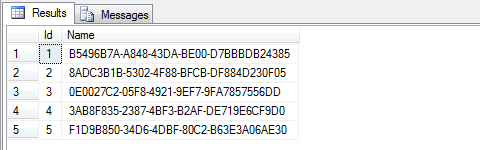
This post is just as a reminder to myself about some of those commands that I have seen in the past and forgotten about until recently, and some new ones I would like to remember (or find here) in the future.
These first two I have seen before:
These first two I have seen before:
SET STATISTICS TIME ON
This will turn on time statistics which in turn will produce time info in the messages pane after a query is run.
Example:
SET STATISTICS TIME ON
WAITFOR DELAY '00:00:02.5'
GO
Output:
SET STATISTICS IO ON
This will turn on IO statistics which in turn will produce IO info in the messages pane after a query is run.
Example:
SET STATISTICS IO ON
SELECT * FROM Person p
INNER JOIN Address a ON p.PostalAddressID=a.AddressID
WHERE IDNumber=456
GO
Output:
Once you no longer want time or IO statistics you can turn the statistics off using:
SET STATISTICS TIME OFF
GO
SET STATISTICS IO OFF
GO
And these ones I haven't:
REPLICATE
This function takes 2 parameters: REPLICATE(string_expressing, integer_expression). Whatever is contained in the string expression will be replicated the number of times specified in the integer_expression.
Example:
SELECT REPLICATE('abc', 3) AS
replicate_example
Output:
BATCH INSERT TEST DATA
This trick reminds me of the strange word function that allows you to create random text in a word document. Next time you have word open try typing (followed by Enter): =rand(9)
To batch insert into a table:
Example:
CREATE TABLE MyTest (Id int identity(1,1) primary key, Name varchar(100) not null)
GO
INSERT MyTest (Name) VALUES (CAST(NEWID() AS varchar(36)))
GO 5
SELECT * FROM MyTest
Output:
Wednesday, 21 August 2013
tSQLt Age Calculator kata
Prior to writing the blog post below I did what I thought was a fairly thorough search of the internet to see if anyone had already produced an "Age Calculator kata". I have since searched again and was rather embarrassed to find a fairly similar blog post on tSQLt (although not actually a kata) that discusses an age calculator in relation to discovering test cases . Further more, I believe the post was created by one of the authors of tSQLt. Although the kata below was inspired by the tests one of my colleagues wrote to calculate a person's age in a production project it is very similar to the existing solution presented here.
I recently did a whole lot of work to put together a tSQLt training course. The course consisted of a number of exercises to demonstrate how, where and why you might use tSQLt tests. I also wanted to give the developers doing the training course some problems to solve that would help them understand some of the principles of TDD (and more specifically test first development).
In C# there are a number of katas that you can find online to help demonstrate TDD. There aren't nearly so many for database unit testing. There are one or two places where you might find tSQLt katas online. I think the best examples can be found at http://datacentricity.net/tag/kata/.
As there are so few tSQLt katas out there I thought I would try my hand at putting together a kata. The kata I have created is an extension of the "Age Calculator kata", a kata that is great for demonstrating boundary conditions.
Here is my kata adapted for tSQLt.
User Story
Business Rules
Possible Tests
The Code
I recently did a whole lot of work to put together a tSQLt training course. The course consisted of a number of exercises to demonstrate how, where and why you might use tSQLt tests. I also wanted to give the developers doing the training course some problems to solve that would help them understand some of the principles of TDD (and more specifically test first development).
In C# there are a number of katas that you can find online to help demonstrate TDD. There aren't nearly so many for database unit testing. There are one or two places where you might find tSQLt katas online. I think the best examples can be found at http://datacentricity.net/tag/kata/.
As there are so few tSQLt katas out there I thought I would try my hand at putting together a kata. The kata I have created is an extension of the "Age Calculator kata", a kata that is great for demonstrating boundary conditions.
Here is my kata adapted for tSQLt.
User Story
Create a simple report that will return all people that have
reached the legal age requirement to obtain their driver’s license.
Business Rules
- The report results should be based on a given current date (e.g. @CurrentDate).
- The report should show the following columns: FullName (e.g. ‘Smith, John’), IDNumber and Age.
Possible Tests
- Write a test to check for the existence of a scalar-valued function called ‘CalculateCurrentAge’.
- Write tests against ‘CalculateCurrentAge’ to verify that the function correctly calculates the current age of a person given the person’s date of birth and the current date. Make sure you consider the boundary conditions. E.g. What about leap years? What if the current date is before the date of birth.
- Write a test to check for the existence of a table-valued function called ‘LegalDrivingAgeReport’.
- Write a test to confirm that only people who have reached the legal driving age appear in the report.
- Write a test to verify that the FullName and IDNumber are returned. The test should prove that the FullName is correctly formatted.
The Code
Use the code below to create the initial database schema.
IF EXISTS (SELECT * FROM INFORMATION_SCHEMA.TABLES WHERE
TABLE_SCHEMA='dbo'
AND TABLE_NAME='Person')
BEGIN
DROP TABLE
[Person]
END
GO
IF EXISTS (SELECT * FROM INFORMATION_SCHEMA.TABLES WHERE
TABLE_SCHEMA='dbo'
AND TABLE_NAME='Address')
BEGIN
DROP TABLE
[Address]
END
GO
CREATE TABLE [Address]
(
AddressID int identity(1,1) not null,
AddressLine1 varchar(200) not null,
AddressLine2 varchar(200) null,
City varchar(200) null,
PostCode varchar(20) not null,
Country varchar(100) not null,
CONSTRAINT PK_Address PRIMARY KEY (AddressID)
)
GO
CREATE TABLE Person
(
PersonID int identity(1,1) not null,
FirstName varchar(100) not null,
Surname varchar(100) not null,
IDNumber varchar(20) not null,
Email varchar(200) not null,
DateOfBirth datetime not null,
ResidentialAddressID int not null,
PostalAddressID int not null,
CONSTRAINT PK_Person PRIMARY KEY (PersonID),
CONSTRAINT
FK_ResidentialAddress FOREIGN KEY (ResidentialAddressID) REFERENCES
[Address](AddressID),
CONSTRAINT FK_PostalAddress FOREIGN KEY (PostalAddressID) REFERENCES [Address](AddressID)
)
Thursday, 13 December 2012
SQL Server CLR and Authorization
Over the past year I have worked on a few projects that have used SQL CLR procedures and functions. SQL Server needs to be configured to run these CLRs. A standard script to get this done would be:
This will generally get your CLR up and running on your server if it's the first time you have installed the CLR. What I have noticed though is that if you backup a database and restore it on another SQL Server in a different Domain with different security setting the CLR stops working with an error like this:
"An error occurred in the Microsoft .NET Framework while trying to load assembly id 65541. The server may be running out of resources, or the assembly may not be trusted with PERMISSION_SET = EXTERNAL_ACCESS or UNSAFE. Run the query again, or check documentation to see how to solve the assembly trust issues. For more information about this error: "
To get your CLRs working again you need to correct the Authorization on the database with the CLR. Here is a script that will allow you to do this:
EXEC sp_configure 'clr enabled', 1;
RECONFIGURE;
GO
DECLARE @cmd NVARCHAR(MAX);
SET @cmd='ALTER DATABASE ' + QUOTENAME(DB_NAME()) + ' SET TRUSTWORTHY ON;';
EXEC(@cmd);
GO
This will generally get your CLR up and running on your server if it's the first time you have installed the CLR. What I have noticed though is that if you backup a database and restore it on another SQL Server in a different Domain with different security setting the CLR stops working with an error like this:
"An error occurred in the Microsoft .NET Framework while trying to load assembly id 65541. The server may be running out of resources, or the assembly may not be trusted with PERMISSION_SET = EXTERNAL_ACCESS or UNSAFE. Run the query again, or check documentation to see how to solve the assembly trust issues. For more information about this error: "
To get your CLRs working again you need to correct the Authorization on the database with the CLR. Here is a script that will allow you to do this:
EXEC sp_configure 'clr enabled', 1;
-- To get the owner SID recorded in the master database for the current database
SELECT owner_sid FROM sys.databases WHERE database_id=DB_ID()

-- To get the owner SID recorded for the current database owner
SELECT sid FROM sys.database_principals WHERE name=N'dbo'

-- The sid's above should be the same
-- To fix:
/*
ALTER AUTHORIZATION ON Database::XXXXX TO [domain\user]
*/
Note the SELECT statements are merely going to show that the SID for the owner of the current database differs to what the master database has recorded as the SID for the current database. To fix the SID on the current database run the ALTER AUTHORIZATION statement replacing the XXXXX with the current database name and the [domain\user] with the user you want to give authorization to e.g. [sa]. Once the authorization has been altered run the first script above to ensure CLR is enabled and TRUSTWORTHY is ON.
Wednesday, 17 October 2012
Tennis Kata - My Solution
Intentional practice is something that is strongly advocated at the company I work for. What we do as intentional practice changes from time to time, but over the last few months we have spent a fair bit of time solving and resolving various kata's.
Here is what I eventually ended up with after numerous runs of the Tennis Kata.
Firstly, the code:
Here is what I eventually ended up with after numerous runs of the Tennis Kata.
Firstly, the code:
    public class Game
    {
        private readonly Point _servicePoint = new Point();
        private readonly Point _receiverPoint = new Point();

        public string Score
        {
            get
            {
                if (_servicePoint.ToString().Equals(Point.FORTY)
                   && (_receiverPoint.ToString().Equals(Point.FORTY)))
                {
                    return "DEUCE";
                }
                return string.Format("{0}-{1}", _servicePoint, _receiverPoint);
            }
        }

        public void ScoreToService()
        {
            _servicePoint.Score(_receiverPoint);
        }

        public void ScoreToReceiver()
        {
            _receiverPoint.Score(_servicePoint);
        }
    }
    public class Point
    {
        public const string LOVE = "0";
        public const string FIFTEEN = "15";
        public const string THIRTY = "30";
        public const string FORTY = "40";
        public const string GAME = "GAME";
        public const string ADVANTAGE = "ADV";

        private string _score = LOVE;
        private Dictionary> _pointMap;

        public Point()
        {
            BuildPointMap();
        }

        public override string ToString()
        {
            return _score;
        }

        public void Score(Point opponentPoint)
        {
            _pointMap[_score].Invoke(opponentPoint);
        }

        private void BuildPointMap()
        {
            _pointMap = new Dictionary>
            {
               {Point.LOVE, o => { _score = Point.FIFTEEN; }},
               {Point.FIFTEEN, o => { _score = Point.THIRTY; }},
               {Point.THIRTY, o => { _score = Point.FORTY; }},
               {
                  Point.FORTY, o =>
                  {
                     if (o.ToString().Equals(Point.FORTY))
                     {
                        _score = ADVANTAGE;
                     }
                     else
                     {
                        _score = o.ToString().Equals(Point.ADVANTAGE)
                                                             ? FORTY
                                                             : GAME;
                     }
                  }
               },
               {Point.ADVANTAGE, o => { _score = GAME; }},
               {Point.GAME, o =>
                 {
                  throw new ApplicationException("Game already completed!");
                 }
               }
            };
        }
    }
And the tests:
    [TestFixture]
    public class TestGame
    {
        [Test]
        public void NewGame_ShouldSetScore_0_0()
        {
            //---------------Set up test pack-------------------
            //---------------Assert Precondition----------------

            //---------------Execute Test ----------------------
            var game = new Game();

            //---------------Test Result -----------------------
            Assert.IsNotNull(game);
            Assert.AreEqual("0-0", game.Score);
        }

        [Test]
        public void ScoreToService_When_0_0_ShouldSetScore_15_0()
        {
            //---------------Set up test pack-------------------
            var game = new Game();
            //---------------Assert Precondition----------------
            Assert.AreEqual("0-0", game.Score);

            //---------------Execute Test ----------------------
            game.ScoreToService();
            //---------------Test Result -----------------------
            Assert.AreEqual("15-0", game.Score);
        }

        [Test]
        public void ScoreToReceiver_When_0_0_ShouldSetScore_0_15()
        {
            //---------------Set up test pack-------------------
            var game = new Game();
            //---------------Assert Precondition----------------
            Assert.AreEqual("0-0", game.Score);

            //---------------Execute Test ----------------------
            game.ScoreToReceiver();
            //---------------Test Result -----------------------
            Assert.AreEqual("0-15", game.Score);
        }

        [Test]
        public void ScoreToReceiver_When_15_15_ShouldSetScore_15_30()
        {
            //---------------Set up test pack-------------------
            var game = new Game();
            game.ScoreToService();
            game.ScoreToReceiver();
            //---------------Assert Precondition----------------
            Assert.AreEqual("15-15", game.Score);

            //---------------Execute Test ----------------------
            game.ScoreToReceiver();
            //---------------Test Result -----------------------
            Assert.AreEqual("15-30", game.Score);
        }

        [Test]
        public void ScoreToService_When_40_15_ShouldSetScore_GAME_15()
        {
            //---------------Set up test pack-------------------
            var game = new Game();
            game.ScoreToService();
            game.ScoreToService();
            game.ScoreToService();
            game.ScoreToReceiver();
            //---------------Assert Precondition----------------
            Assert.AreEqual("40-15", game.Score);

            //---------------Execute Test ----------------------
            game.ScoreToService();
            //---------------Test Result -----------------------
            Assert.AreEqual("GAME-15", game.Score);
        }

        [Test]
        public void ScoreToService_When_30_40_ShouldSetScore_DEUCE()
        {
            //---------------Set up test pack-------------------
            var game = new Game();
            game.ScoreToService();
            game.ScoreToService();
            game.ScoreToReceiver();
            game.ScoreToReceiver();
            game.ScoreToReceiver();
            //---------------Assert Precondition----------------
            Assert.AreEqual("30-40", game.Score);

            //---------------Execute Test ----------------------
            game.ScoreToService();
            //---------------Test Result -----------------------
            Assert.AreEqual("DEUCE", game.Score);
        }

        [Test]
        public void ScoreToService_When_DEUCE_ShouldSetScore_ADV_40()
        {
            //---------------Set up test pack-------------------
            var game = new Game();
            game.ScoreToService();
            game.ScoreToService();
            game.ScoreToService();

            game.ScoreToReceiver();
            game.ScoreToReceiver();
            game.ScoreToReceiver();
            //---------------Assert Precondition----------------
            Assert.AreEqual("DEUCE", game.Score);

            //---------------Execute Test ----------------------
            game.ScoreToService();
            //---------------Test Result -----------------------
            Assert.AreEqual("ADV-40", game.Score);
        }

        [Test]
        public void ScoreToReceiver_When_40_ADV_ShouldSetScore_40_GAME()
        {
            //---------------Set up test pack-------------------
            var game = new Game();
            game.ScoreToService();
            game.ScoreToService();
            game.ScoreToService();

            game.ScoreToReceiver();
            game.ScoreToReceiver();
            game.ScoreToReceiver();
            game.ScoreToReceiver();
            //---------------Assert Precondition----------------
            Assert.AreEqual("40-ADV", game.Score);

            //---------------Execute Test ----------------------
            game.ScoreToReceiver();
            //---------------Test Result -----------------------
            Assert.AreEqual("40-GAME", game.Score);
        }

        [Test]
        public void ScoreToReceiver_When_DEUCE_ShouldSetScore_40_ADV()
        {
            //---------------Set up test pack-------------------
            var game = new Game();
            game.ScoreToService();
            game.ScoreToService();
            game.ScoreToService();

            game.ScoreToReceiver();
            game.ScoreToReceiver();
            game.ScoreToReceiver();
            //---------------Assert Precondition----------------
            Assert.AreEqual("DEUCE", game.Score);

            //---------------Execute Test ----------------------
            game.ScoreToReceiver();
            //---------------Test Result -----------------------
            Assert.AreEqual("40-ADV", game.Score);
        }
    }
    [TestFixture]
    public class TestPoint
    {
        // ReSharper disable InconsistentNaming
        [Test]
        public void NewPoint_ShouldSetToString_0()
        {
            //---------------Set up test pack-------------------
            //---------------Assert Precondition----------------
            //---------------Execute Test ----------------------
            var point = new Point();
            //---------------Test Result -----------------------
            Assert.IsNotNull(point);
            Assert.AreEqual(Point.LOVE, point.ToString());
        }

        [Test]
        public void Score_When_0_ShouldSetToString_15()
        {
            //---------------Set up test pack-------------------
            var point = new Point();
            //---------------Assert Precondition----------------
            Assert.AreEqual(Point.LOVE, point.ToString(), "PRE CONDITION");
            //---------------Execute Test ----------------------
            point.Score(new Point());
            //---------------Test Result -----------------------
            Assert.AreEqual(Point.FIFTEEN, point.ToString());
        }

        [Test]
        public void Score_When_15_ShouldSetToString_30()
        {
            //---------------Set up test pack-------------------
            var point = new Point();
            point.Score(new Point());
            //---------------Assert Precondition----------------
            Assert.AreEqual(Point.FIFTEEN, point.ToString(), "PRE CONDITION");
            //---------------Execute Test ----------------------
            point.Score(new Point());
            //---------------Test Result -----------------------
            Assert.AreEqual(Point.THIRTY, point.ToString());
        }

        [Test]
        public void Score_When_30_ShouldSetToString_40()
        {
            //---------------Set up test pack-------------------
            var point = new Point();
            point.Score(new Point());
            point.Score(new Point());
            //---------------Assert Precondition----------------
            Assert.AreEqual(Point.THIRTY, point.ToString(), "PRE CONDITION");
            //---------------Execute Test ----------------------
            point.Score(new Point());
            //---------------Test Result -----------------------
            Assert.AreEqual(Point.FORTY, point.ToString());
        }

        [Test]
        public void Score_When_40_ShouldSetToString_GAME()
        {
            //---------------Set up test pack-------------------
            var point = new Point();
            point.Score(new Point());
            point.Score(new Point());
            point.Score(new Point());
            //---------------Assert Precondition----------------
            Assert.AreEqual(Point.FORTY, point.ToString(), "PRE CONDITION");
            //---------------Execute Test ----------------------
            point.Score(new Point());
            //---------------Test Result -----------------------
            Assert.AreEqual(Point.GAME, point.ToString());
        }

        [Test]
        public void Score_When_40_40_ShouldSetToString_ADV()
        {
            //---------------Set up test pack-------------------
            var point = new Point();
            var opponentPoint = new Point();
            point.Score(opponentPoint);
            point.Score(opponentPoint);
            point.Score(opponentPoint);
            opponentPoint.Score(point);
            opponentPoint.Score(point);
            opponentPoint.Score(point);
            //---------------Assert Precondition----------------
            Assert.AreEqual(Point.FORTY, point.ToString(), "PRE CONDITION");
            Assert.AreEqual(Point.FORTY, opponentPoint.ToString(), "PRE CONDITION");
            //---------------Execute Test ----------------------
            point.Score(opponentPoint);
            //---------------Test Result -----------------------
            Assert.AreEqual(Point.ADVANTAGE, point.ToString());
        }

        [Test]
        public void Score_When_40_ADV_ShouldSetToString_40()
        {
            //---------------Set up test pack-------------------
            var point = new Point();
            var opponentPoint = new Point();
            point.Score(opponentPoint);
            point.Score(opponentPoint);
            point.Score(opponentPoint);
            opponentPoint.Score(point);
            opponentPoint.Score(point);
            opponentPoint.Score(point);
            opponentPoint.Score(point);
            //---------------Assert Precondition----------------
            Assert.AreEqual(Point.FORTY, point.ToString(), "PRE CONDITION");
            Assert.AreEqual(Point.ADVANTAGE, opponentPoint.ToString(), "PRE CONDITION");
            //---------------Execute Test ----------------------
            point.Score(opponentPoint);
            //---------------Test Result -----------------------
            Assert.AreEqual(Point.FORTY, point.ToString());
        }

        [Test]
        public void Score_When_ADV_40_ShouldSetToString_GAME()
        {
            //---------------Set up test pack-------------------
            var point = new Point();
            var opponentPoint = new Point();
            point.Score(opponentPoint);
            point.Score(opponentPoint);
            point.Score(opponentPoint);
            opponentPoint.Score(point);
            opponentPoint.Score(point);
            opponentPoint.Score(point);
            point.Score(opponentPoint);
            //---------------Assert Precondition----------------
            Assert.AreEqual(Point.ADVANTAGE, point.ToString(), "PRE CONDITION");
            Assert.AreEqual(Point.FORTY, opponentPoint.ToString(), "PRE CONDITION");
            //---------------Execute Test ----------------------
            point.Score(opponentPoint);
            //---------------Test Result -----------------------
            Assert.AreEqual(Point.GAME, point.ToString());
        }

        [Test]
        public void Score_When_GAME_0_ShouldError()
        {
            //---------------Set up test pack-------------------
            var point = new Point();
            var opponentPoint = new Point();
            point.Score(opponentPoint);
            point.Score(opponentPoint);
            point.Score(opponentPoint);
            point.Score(opponentPoint);
            //---------------Assert Precondition----------------
            Assert.AreEqual(Point.GAME, point.ToString(), "PRE CONDITION");
            //---------------Execute Test ----------------------
            var ex = Assert.Throws(() => point.Score(opponentPoint));
            //---------------Test Result -----------------------
            StringAssert.Contains("Game already completed!", ex.Message);
        }
    }
Monday, 30 July 2012
Getting Started with Ruby
In my day job, we use ruby rake files for biulding our .net projects. The rake files are run by our continuous integration server and build the projects, run unit tests, coverage reports and more. Over the past year they have evolved and gained more and more in the way of functionality. I have spent a fair amount of time hacking around in them to add and improve existing functionality picking up bits of ruby as I go along. I am now at a point where I want to get to know ruby a little better and thought I might document some of my learning.
To get started, if you want to work with ruby you will need to download and install it on your pc. Ruby can run on a number of operating systems, but in my case I am working on a Windows pc. To download and install the latest version of ruby go to: www.rubyinstaller.org/downloads/ and select the latest ruby installer download. Once the download is complete double click the exe to install.
Once ruby is installed you will need to add the path the the ruby.exe to your environment variables path. Heres how to do it:
Windows XP : http://support.microsoft.com/kb/310519
Windows 7 : http://geekswithblogs.net/renso/archive/2009/10/21/how-to-set-the-windows-path-in-windows-7.aspx
Here is how you might create a hello world ruby script:

To get started, if you want to work with ruby you will need to download and install it on your pc. Ruby can run on a number of operating systems, but in my case I am working on a Windows pc. To download and install the latest version of ruby go to: www.rubyinstaller.org/downloads/ and select the latest ruby installer download. Once the download is complete double click the exe to install.
Once ruby is installed you will need to add the path the the ruby.exe to your environment variables path. Heres how to do it:
Windows XP : http://support.microsoft.com/kb/310519
Windows 7 : http://geekswithblogs.net/renso/archive/2009/10/21/how-to-set-the-windows-path-in-windows-7.aspx
Here is how you might create a hello world ruby script:
- Create a new folder for the scripts c:\rubyscripts
- Add a new text document in the folder called hello_world.rb
- Edit the script in your favourite text editor and add the following
puts "hello world"
- Open a command prompt in the c:\rubyscripts folder
- Run the following c:\rubyscripts\ruby hello_ruby.rb

Thursday, 28 June 2012
Strange Web Services Exception
One of the application I work on started playing up recently. The application communicates with one of our customers systems via web services. Due to technical reasons on their side they are changing the platform that their web services run on. This has meant that we have had to make some changes to accomodate their changes and get our application talking to the new web services correctly. Once released into their testing environment some of the web services call started to throw a System.ServiceModel.CommunicationException:
It turns out the problem is down to the fact that the User account that the Application Pool associated with the web services website does not have read and write permissions to the c:\windows\temp directory as described here http://support.microsoft.com/kb/322886. Below is a more detailed step by step approach that I to solve the issue.
System.ServiceModel.CommunicationException: There was an error in serializing body of message checkIssueDeliveryRequest:
'Unable to generate a temporary class (result=1).  error CS2001: Source file '
C:\Windows\TEMP\rjsmbtjy.0.cs' could not be found  error CS2008: No inputs specified  '.
Please see InnerException for more details. ---> System.InvalidOperationException: Unable to generate a temporary class (result=1).
error CS2001: Source file 'C:\Windows\TEMP\rjsmbtjy.0.cs' could not be found  error
CS2008: No inputs specified
at System.Xml.Serialization.Compiler.Compile(Assembly parent, String ns, XmlSerializerCompilerParameters xmlParameters, Evidence evidence)
....
....
It turns out the problem is down to the fact that the User account that the Application Pool associated with the web services website does not have read and write permissions to the c:\windows\temp directory as described here http://support.microsoft.com/kb/322886. Below is a more detailed step by step approach that I to solve the issue.
- Open IIS Manager
- Click on the web services application node of the problem web services website
- Click on Basic Settings... to see what Application Pool is being used (in my case it was ASP.NET v4.0 Integrated)
- Click the Application Pools node and select the Application Pool associated with your web services website
- Click on Advances Settings... and check the Process > Identity to get the account that is being used
- Open an explorer window and browse to c:\windows\temp
- Right click on the folder and click properties
- Select the Security tab and click Edit:
- If the account already appears under "Group or user names:", highlight the account by clicking on it and ensure that the read and write checkboxes are checked
- If it is not already listed click Add... to add the account before ensuring that the read and write permission are checked for that account
Friday, 15 June 2012
T-SQL: Scripting tables and Named constraints
In a number of projects that I am currently working on I have had to make schema changes. When creating these schema changes we generally create changes scripts that get run as part of a version upgrade. The change scripts will generally be applied either on application startup or by a command line application that will run any new upgrade scripts and update a version number in that database. To get an idea of how this can be done have a look at how FluentMigrator works.
I don't particularly like creating new tables in SQL Server Management Studio and then using the script generator to create a create table script as I find the resulting scripts are always pretty verbose.
Writing a create table script is pretty straight forward. Here is an example:
One thing that is not demonstrated in this code snippet is how to add a second named constraint onto a field. It is pretty straight forward. I have specifically layed out the example with the constraints indented on the line below the field they relate to. Notice that there is no comma before the CONSTRAINT keyword. To add another constraint that applies to the same field, you just add another constraint keyword and continue. I have indented the constraints and put them on their own line so that the code is more readable in the case where there are multiple constraints on any one field.
I don't particularly like creating new tables in SQL Server Management Studio and then using the script generator to create a create table script as I find the resulting scripts are always pretty verbose.
Writing a create table script is pretty straight forward. Here is an example:
CREATE TABLE [dbo].[Employee]
(
  EmployeeID int not null PRIMARY KEY,
  FirstName varchar(100) not null,
  LastName varchar(100) not null
)
The problem with this script is that the primary key is not explicitly named. So how do we go about explicitly naming the primary key constraint and for that matter any other constraint. Here is an example that demonstrates how to do this for primary keys, foreign keys and unique constrains:
CREATE TABLE [dbo].[JobTitle]
(
 JobTitleID int not null
  CONSTRAINT [PK_JobTitle] PRIMARY KEY (JobTitleID),
 Name varchar(100) not null,
 [Description] varchar(2000) null
)

CREATE TABLE [dbo].[Employee]
(
  EmployeeID int not null
 CONSTRAINT [PK_Employee] PRIMARY KEY (EmployeeID),
  FirstName varchar(100) not null,
  LastName varchar(100) not null,
  IDNumber varchar(30) not null
 CONSTRAINT [UC_IDNumber] UNIQUE (IDNumber),
  JobTitleID int null
 CONSTRAINT [FK_Employee_JobTitle] REFERENCES [dbo].[JobTitle]
)
One thing that is not demonstrated in this code snippet is how to add a second named constraint onto a field. It is pretty straight forward. I have specifically layed out the example with the constraints indented on the line below the field they relate to. Notice that there is no comma before the CONSTRAINT keyword. To add another constraint that applies to the same field, you just add another constraint keyword and continue. I have indented the constraints and put them on their own line so that the code is more readable in the case where there are multiple constraints on any one field.
Friday, 1 June 2012
SQLCMD and BACKUP - watch out for this
Yesterday, I was working creating a rake task for backing up a database. As I am still pretty new to ruby I decided to see if I could get the backup code working with sqlcmd from the command line first. I created a backupdb.sql file to do the backup and then called it from the command line.
This is what the backupdb.sql looked like:
Not much to it!
I then executed the following sqlcmd command:
When I just specified the database and backupfilename the backup worked fine with the backup file being written to the default SQL Server backup folder. I then changed the backupfilename to include a path as I wanted to specify where the backup file should be saved.
This is the command I executed:
This time I got the following error:
Msg 102, Level 15, State 1, Server ANDREW-PC, Line 3 Incorrect syntax near 'E:'.
After a lot of fiddling around I figured out what I needed to do to fix the problem. The problem was that the backupfilename needs to be unicode. See below for the fixed backupdb.sql
This is what the backupdb.sql looked like:
BACKUP DATABASE $(database)
    TO DISK = $(backupfilename)
I then executed the following sqlcmd command:
sqlcmd -S localhost -i BackupDb.sql -v database="mydb" -v backupfilename="mydb.bak"
sqlcmd -S localhost -i BackupDb.sql -v database="mydb" -v backupfilename="E:\sqlbackups\mydb.bak"
This time I got the following error:
Msg 102, Level 15, State 1, Server ANDREW-PC, Line 3 Incorrect syntax near 'E:'.
After a lot of fiddling around I figured out what I needed to do to fix the problem. The problem was that the backupfilename needs to be unicode. See below for the fixed backupdb.sql
BACKUP DATABASE $(database)
    TO DISK = N'$(backupfilename)'
Thursday, 24 May 2012
SQL Server - Query to get table sizes
Once again I am posting SQL that I have found on the internet (mainly so that I have can find this scriopt easily in the future). This one is thanks to marc_s and can be found in this Stackoverflow post.
The script will give you a breakdown of the table size for each table in your database. This includes a row count, disk space used and disk space available. I have modified the original script slightly as a number of databases I work with have multiple schemas and the original script doesn't show the schema name.
SELECT
    s.NAME AS SchemaName,
    t.NAME AS TableName,
    p.rows AS RowCounts,
    SUM(a.total_pages) * 8 AS TotalSpaceKB,
    SUM(a.used_pages) * 8 AS UsedSpaceKB,
    (SUM(a.total_pages) - SUM(a.used_pages)) * 8 AS UnusedSpaceKB
FROM  sys.tables t
INNER JOIN sys.Schemas s ON t.schema_id = s.schema_id
INNER JOIN sys.indexes i ON t.OBJECT_ID = i.object_id
INNER JOIN sys.partitions p ON i.object_id = p.OBJECT_ID AND i.index_id = p.index_id
INNER JOIN sys.allocation_units a ON p.partition_id = a.container_id
WHERE
    t.NAME NOT LIKE 'dt%'
    AND t.is_ms_shipped = 0
    AND i.OBJECT_ID > 255
GROUP BY
 s.Name,
    t.Name,
    p.[Rows]
ORDER BY
 s.Name,
    t.Name
Subscribe to:
Posts (Atom)